 Afield
1. Give Afield a usable offer
Open the Afield workspace and choose Let AI read your website. Supply your company URL and the product facts a public page might miss: the customers you serve, what you sell and the next step you can offer. Review the learned description before continuing. Correct a wrong audience here, because it would otherwise affect every search and draft.
You can complete the research and drafting steps before connecting an email account. Have one product source ready; a website or capability sheet is enough to begin a small, inspectable task.
Worked example: a custom-machining supplier wants to open supplier-qualification conversations with packaging-equipment manufacturers. The campaign below is illustrative; use your actual capabilities and market.
We supply custom machined components to packaging-equipment manufacturers.
Use our website and the capability sheet I provided. Our first step is
a supplier-qualification discussion, not an immediate price quote.
2. Find five companies, then inspect one
Find five packaging-equipment manufacturers in Germany. Exclude
consulting-only firms and pure distributors. Include each website,
relevant product line, fit reason and supporting source.
Open one returned company and follow the source behind its fit reason. Look for the equipment it actually makes. A business that sells packaging materials or distributes another manufacturer’s machines may match the broad word “packaging” while missing this brief.
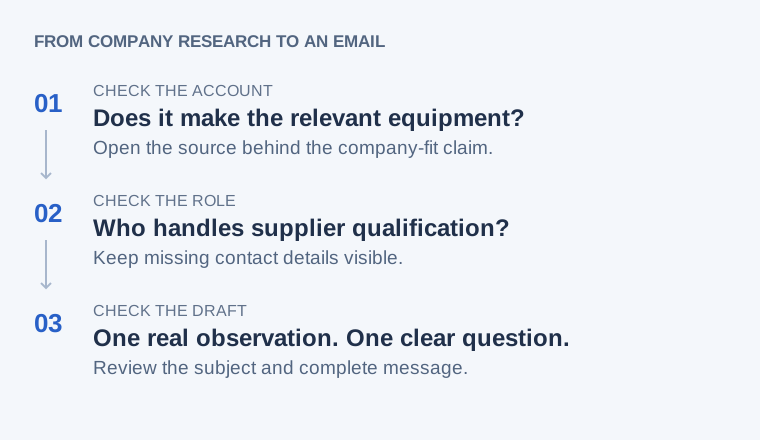
If a candidate fails the brief, explain the specific mismatch in the same conversation and ask Afield to apply that exclusion to the remaining list. If no credible matches appear, broaden one condition—such as geography—while keeping the manufacturer requirement. Record which condition changed.
3. Continue from the selected company
For this company, which product line relates to our machining offer?
Show its source. Find the role or team responsible for supplier
qualification, and distinguish a public contact route from an inferred
address. Keep working with this company.
A suitable company can remain on the list while its contact route is researched. If you only have a shared business mailbox, use a team greeting rather than an unrelated person’s name. See the contact-research example.
4. Request and edit the complete email
Prepare one introductory email for the selected company. Use the
supported product observation above, ask about supplier qualification,
and include a subject and complete body. Keep it as a draft.
Demo draft: “Demo Packaging” is fictional. This illustrates the requested output, not a retrieved company or sent email.
Subject: Machined-component supplier qualification
Hello Demo Packaging team,
Your case-packing equipment is the part of your business most relevant to our custom machining work. Could you point me to the team that evaluates new component suppliers?
I can send our capability sheet against your qualification requirements. What information would be useful for an initial review?
Best,
[Name]
Replace the demo observation with the selected company’s actual source and remove any offer you cannot deliver. Request revisions in the same conversation so the research remains attached to the message.
5. Reopen the result
Open Tasks → History and find the task by its business purpose. Open the available saved result, then use the original conversation to continue. For this walkthrough, you should be able to read the selected company’s source and the email’s subject and complete body.
If the history entry has only an execution log, that is not the email. Check whether the original conversation contains a saved draft and whether execution reported a save failure. Keep any existing draft; investigate the missing link before generating a replacement. See task recovery.
Sending is a separate next step. Connect an available mailbox, choose a usable recipient and review the final message before confirming the send. The sending guide explains what to inspect afterwards.
For a real public-source selection example, compare the three companies in company research to an individual email. For another kind of task, browse all 19 capabilities.