 Afield
In this article
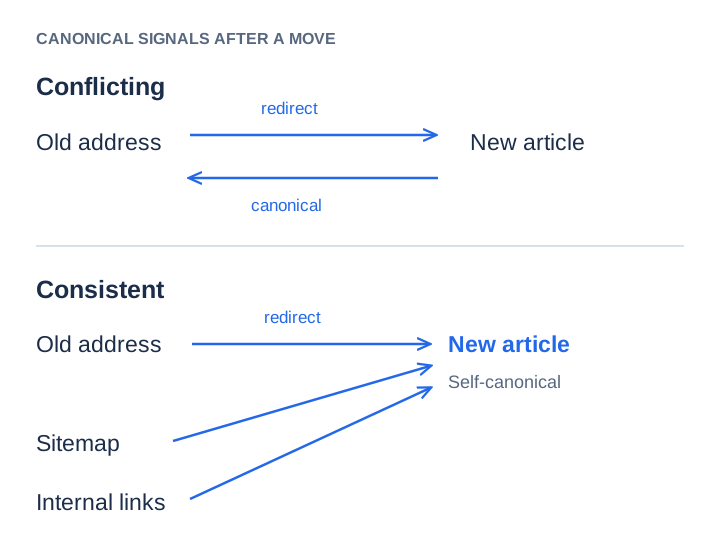
An article can move successfully for people and still send conflicting address signals to a search engine. The old URL redirects to the new one, but the new page’s canonical tag points back. Meanwhile, the sitemap lists one version and the blog index links to the other.
Start by writing down the one address you intend to keep. Then make the redirect, final HTML, internal links and sitemap agree with that decision. These checks are about duplicate versions of the same content; two different articles on the same topic need a different decision.
Diagnose the loop before changing anything
Consider an illustrative move from /posts/import-checklist to /blog/import-checklist. A request to the old path returns a permanent redirect. The new path returns 200, but contains:
<link rel="canonical" href="https://example.com/posts/import-checklist">The new page is pointing at an address that sends visitors straight back. This often survives a visual review because the article itself looks fine. Check the delivered HTML, not only the title field visible in a CMS editor.
Also inspect response headers for a canonical Link header and robots directives. If the template and a plugin emit competing declarations, fixing one field may leave the other in place. Keep the first response and final response in your audit so you can distinguish the redirect from the destination.
A real public example of the intended result
On October 11, 2026, Afield’s old English comparison address returned the following public response:
https://afieldai.io/compare/afield-vs-semrush
  → 301 Location: /blog/compare-afield-vs-semrush

https://afieldai.io/blog/compare-afield-vs-semrush
  → 200
  → canonical: https://afieldai.io/blog/compare-afield-vs-semrush
The English entry in the public sitemap also names the blog address. You can inspect the destination and sitemap. Localized comparisons remain separate language pages. This check confirms the site’s declarations at that date; Google’s chosen canonical must be checked separately.
Repair the place that generates the wrong address
Follow the stale value back to its source. A canonical can come from a global base URL, the CMS permalink, a per-page override, an imported SEO field or a rendering template. Check these in that order of scope: a global setting can affect hundreds of pages, while a page override may affect only one.
For the illustrative import article, the final declaration should be:
<link rel="canonical" href="https://example.com/blog/import-checklist">Remove the stale declaration rather than appending another one. Preserve the publication date. A migration is not a reason to make an old article appear newly written, although a substantive accompanying revision can justify updating its modification date.
| Surface | Acceptance check |
|---|---|
| Old address | A permanent redirect reaches the equivalent article directly. |
| New address | The intended article returns 200 and can be read without a login. |
| Canonical | The final page declares its intended preferred address consistently. |
| Internal navigation | The blog index and relevant article links use the new address. |
| Sitemap | The preferred address is listed; the redirected old entry is removed. |
Verify the deployed response, not just the source file
curl -sS --max-time 20 -D - -o /dev/null https://example.com/posts/import-checklist
curl -sS --max-time 20 -L -o /dev/null \
  -w '%{http_code} %{url_effective}\n' https://example.com/posts/import-checklist
curl -sS --max-time 20 https://example.com/blog/import-checklist
If the deployed page still contains the old value, check which release produced it and whether a cached response is being served. Rebuilding the local page again cannot invalidate an unrelated production cache. Save the final response and release reference with the migration map so the next editor can reproduce the check.
Once the public response is consistent, use Search Console URL Inspection to compare the user-declared and Google-selected canonicals. Record the crawl date: a result from before the deployment does not describe the repaired page. Recrawling is not immediate, and a request to recrawl is not a confirmation of indexing.
When a canonical is the wrong repair
A short import checklist and a detailed import-error troubleshooting guide may share product terms while serving different readers. Keep both if each contains a distinct answer. Give each its own canonical and link between them where the reader’s next question warrants it.
If one article is a thin copy of the other, make an editorial decision first: combine the useful material or write the missing answer. Canonicalizing unrelated or substantially different content is not a substitute for deciding what deserves to remain published.
Google describes redirects and canonical annotations as stronger signals than sitemap inclusion, and it may select a different canonical from the one you declare. Its canonicalization documentation is the reference for those signals. For the inventory work around a move, use the sitemap audit and worksheet.