 Afield
In this article
A sitemap can be valid XML and still send search engines to the wrong pages. The most useful audit compares three things: the URLs the sitemap lists, the responses those URLs return, and the pages your publication actually contains.
This walkthrough uses a public Afield URL move checked on October 11, 2026, then shows how to record the other cases you are likely to find. You can repeat the HTTP checks without signing in or changing the site.
Start with one real URL move
Afield’s English Semrush comparison moved from a comparison directory into the blog. The public responses at the time of the check were:
GET /compare/afield-vs-semrush
301
Location: /blog/compare-afield-vs-semrush

GET /blog/compare-afield-vs-semrush
200
Canonical: https://afieldai.io/blog/compare-afield-vs-semrush
The main sitemap lists the English /blog/ address. Its Chinese, Spanish and German versions still use localized /compare/ paths. Those are separate language URLs, not accidental copies of the old English address. A text search for the word “compare” would flag good entries along with the retired one; inspect each complete URL.
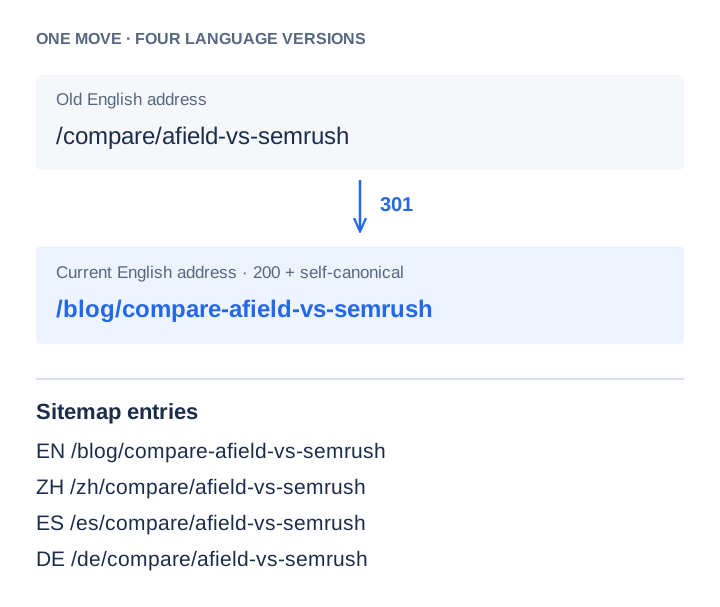
Try the old address, the current article and the public sitemap. The example shows what a consistent migration looks like. It is not a claim that a redirect alone improves ranking.
Build the inventory before judging individual rows
Export the URLs from your CMS or maintained publication list. Separately extract the loc entries from the sitemap. If the file is a sitemap index, follow its child sitemaps before comparing the two sets. Do not count a language alternate inside an entry as another entry.
The difference between these inventories answers two distinct questions. A published article absent from the sitemap may have been missed by the generator. A sitemap entry absent from the publication may be a retired route, a deliberate landing page or a stale URL. Investigate the difference rather than deleting everything that fails a string match.
Record the intended language, indexability and canonical URL beside each page. This prevents a draft, login screen or language duplicate from being added simply to make the counts match.
Give each URL a specific disposition
| Observed behavior | Check before acting | Disposition |
|---|---|---|
| 200 with the intended article and a matching canonical | Is it public, indexable and linked from the site? | Keep the preferred URL. |
| 301 or 308 to a replacement | Does the destination contain the equivalent content, without another redirect? | List the destination; preserve the old redirect for incoming visits. |
| 200 with a canonical naming another page | Is it a deliberate duplicate, or stale metadata from a migration? | List the preferred page. Repair the metadata if the declaration is wrong. |
| 404 or 410 | Was the page intentionally removed? Is there an equivalent replacement? | Remove the dead entry. Use a redirect only when the replacement fits. |
| 200 with an error, empty shell or “not found” message | Inspect the rendered page as well as the headers. | Fix the route or response. A 200 alone is not a pass. |
| Timeout or 5xx | Repeat a bounded check and examine server logs. | Record an unresolved availability problem, not a permanent removal. |
Use the audit worksheet to separate the observed response from your proposed change. It includes the real English migration row and a blank row for the next URL.
Run the checks and read the result
# 1. Read the first response. Do not follow the redirect yet.
curl -sS --max-time 20 -D - -o /dev/null \
  https://afieldai.io/compare/afield-vs-semrush

# 2. Follow it and show the final status and address.
curl -sS --max-time 20 -L -o /dev/null \
  -w '%{http_code} %{url_effective}\n' \
  https://afieldai.io/compare/afield-vs-semrush

# 3. Read the final page's HTML and the public sitemap.
curl -sS --max-time 20 https://afieldai.io/blog/compare-afield-vs-semrush
curl -sS --max-time 20 https://afieldai.io/sitemap.xml
In the HTML, look for a single intended canonical and any robots directives. In the response headers, check for X-Robots-Tag as well. Then open the page in a browser: the article should be readable, links should work and the mobile layout should not hide the answer.
If the browser looks correct but the initial HTML is an empty application shell, record that distinction. It is a rendering question that a sitemap edit cannot resolve. Similarly, a robots.txt block and a noindex directive are different controls; do not describe both simply as “not in the sitemap.”
Fix the generator, then check the deployed file
Suppose a retired URL disappears after a manual edit but returns with the next release. The source is still wrong. Locate the CMS collection, route manifest or build script emitting the old address. Store the old-to-new mapping there, regenerate, and inspect the release output before deployment.
Use modification dates for meaningful page changes. Google’s sitemap guidance says that accurate lastmod values can help it understand updates; rewriting every date on every build makes that field less useful. A copyright update is not the same as a revised article.
After deployment, fetch the public file again. A local sitemap can be correct while a CDN or a different release still serves the previous one. Repeat the HTTP and canonical checks on changed routes, then check one internal link leading into each repaired page.
What submitting the sitemap does—and what comes next
Submission gives Google a way to discover the URLs. It does not certify their quality or guarantee that they will be indexed. Keep the audit result separate from Search Console’s indexing result.
If an intended page is still excluded, inspect that URL in Search Console and record the reason and report date. “Discovered, not indexed” calls for a different investigation from a redirect or an intentional alternate canonical. Repeatedly submitting an unchanged file will not repair a thin article, an unavailable server or contradictory canonical signals.
For conflicting metadata, continue with the canonical migration walkthrough. For a new article that has not appeared yet, use the discovery, access and content checks.