 Afield
In this article
Choose the question a screenshot should answer before editing it. To explain where a reader can inspect a company match, preserve the company identity, the relevant navigation and the explanation panel. A decorative frame cannot compensate for unreadable text.
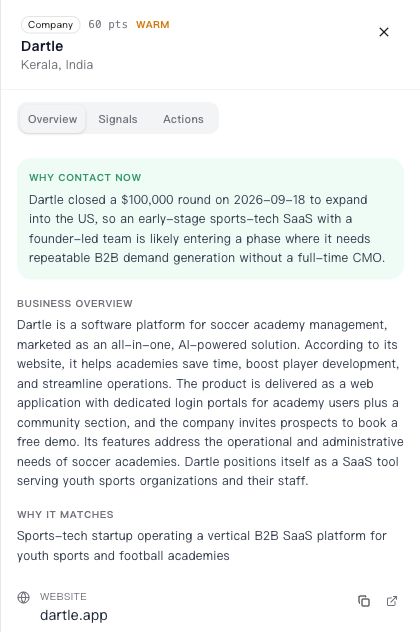
What this capture can and cannot show
The image above shows where the Overview, Signals and Actions tabs appear. It also contains a long company explanation. Keep that distinction in the caption: a picture of an explanation is not independent proof of the explanation’s claims, and an older capture may differ from the current interface.
| Editorial task | Keep | Check before release |
|---|---|---|
| Explain tab navigation | Company header and all three tab labels | The named tabs still exist in the current product. |
| Discuss the match explanation | The relevant panel, with text large enough to inspect | Separate observed company facts from the product’s interpretation in the article. |
| Show only one control | Enough surrounding UI to locate it | The crop does not hide a required preceding step. |
| Show sent or published status | The destination record and actual status | A draft or generated text cannot stand in for a completed external action. |
Prepare the figure without changing its meaning
- Retain the original file. Record the page, product state and capture date if known; mark an unknown date rather than guessing.
- Crop unrelated browser chrome or empty margins. Preserve any context the instruction needs.
- Use a fresh, higher-resolution capture if the text is unreadable. If an enhanced derivative is used, label it and compare every visible label, number and date with the original.
- Put callouts outside the interface or make their editorial origin obvious. Do not add a control that the product lacks.
- Inspect the figure at the actual article width and on a narrow screen. Offer the original image separately when readers need to examine detail.
A compact handoff record for the editor
Source: company-detail-en.png
Purpose: Orient the reader to the company-detail tabs
Known provenance: Retained interface capture; capture date not established
Content boundary: On-screen company claims not fact-checked for this article
Permitted changes: Crop surrounding space; resize for display; add external caption
Must remain exact: Company name, scores, dates, tab names and explanation text
Release check: Compare with current UI if used as a step-by-step product instruction
For dense content, transcribe the part needed for the explanation into selectable HTML and verify it against the source. Use a labeled diagram if you need to explain a concept that no capture shows. Keep the original image and its derivative together so the next editor can start from the source.