 Afield
In this article
A dated screenshot needs a different repair from an article that never answers its title. Before editing an old post, write down what a reader is trying to do and where the page prevents it.
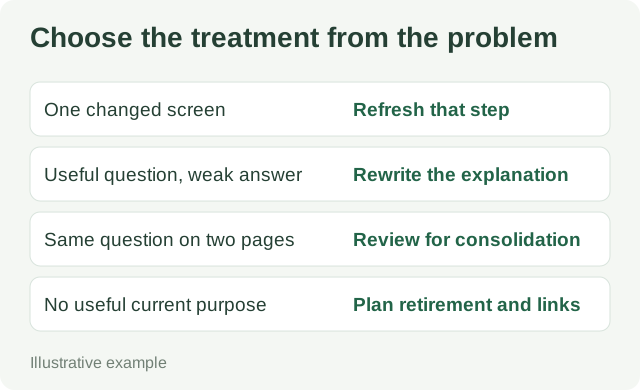
Use a decision register, one page at a time
Demo editorial audit: the following pages and observations are constructed examples.
| Page and observed problem | Decision | Work to ship |
|---|---|---|
| Export tutorial: instructions work, but a menu label changed | Refresh | Replace the label and screenshot; repeat the export procedure. |
| “Review your first prospect list”: says to check quality but gives no decision rule | Rewrite | Add a target rule, accepted/rejected rows and a correction to the next search. |
| Two CSV guides both answer the same field-mapping question | Consider combining | Compare both fully. Preserve unique examples and select a destination before changing URLs. |
| Registration page for an event that has ended | Retire or repurpose | Remove the active-registration promise; retain an archive if the recording or materials remain useful. |
Low traffic is a reason to investigate. It does not tell you which treatment is appropriate: a narrow support article may be useful to the few buyers who need it.
Replace one weak passage with a usable answer
Before: “Review your leads carefully to ensure they match your ideal customer profile. Focus on quality over quantity and optimize your search as you learn.”
After:
Start with five companies from the list. For this campaign, keep companies selling software for onboarding external customers. Reject employee-onboarding tools.
For each company, open the product page and record which audience it names. A page about implementation teams collaborating with customers passes. A page about new-hire paperwork fails. A broad process platform covering both stays in a research bucket until you can identify the relevant product and audience.
If two of the five companies are employee-onboarding tools, change the next search to include “customer implementation” and exclude “employee onboarding.” Keep the rejected rows and reasons so the next reviewer can see what changed.
The replacement gives the reader a rule, a borderline case and a specific correction. It can be tested by asking a colleague to classify the same five companies without extra instructions.
Check the consequences before removing a URL
- Inspect the page’s search queries, incoming links and links from your own site.
- Move any unique procedure, sample file or useful explanation to the chosen destination.
- If the content has permanently moved to an equivalent page, configure an appropriate permanent redirect and update internal links.
- Open both addresses after release. Confirm that the destination answers the old page’s question.
Google documents 301 and 308 redirects for permanent moves. A redirect signals a move; it does not fix an unrelated or incomplete destination. If there is no useful replacement, decide explicitly whether an archive or removal best serves the reader instead of sending every retired URL to the homepage.