 Afield
A shortlist you can work from
Afield researches companies against your product, market and exclusions, then keeps the company record available for the next task. You can inspect the business, ask why it fits, find the relevant contact and prepare an email without pasting the research into another writing tool.
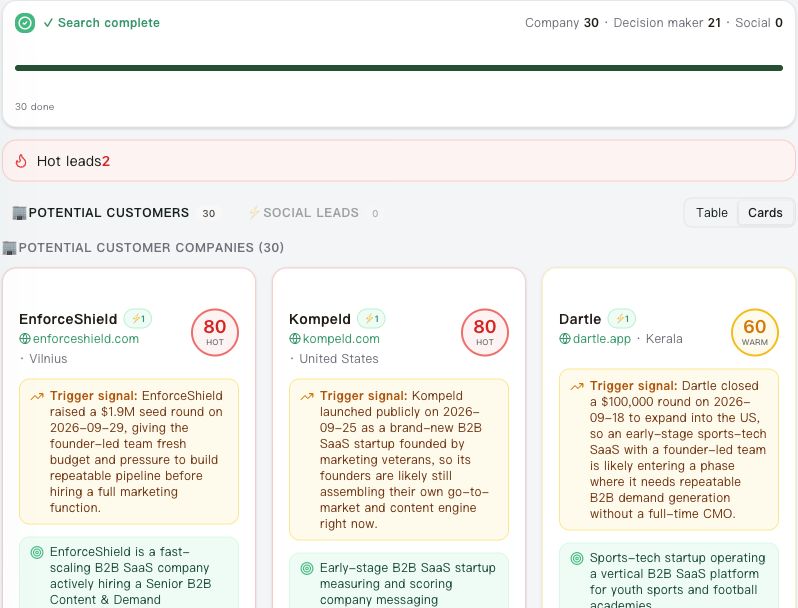
What travels with a company
| In the result | How you use it |
|---|---|
| Company and official website | Confirm that you found the operating business, rather than a directory or namesake. |
| Business overview and fit rationale | See which product, audience or geography supports including the company. |
| Public signals and sources | Open the observation behind an outreach angle. |
| Contacts and missing details | Choose the next research step before drafting to a recipient. |
The company panel also keeps notes and contact history. A good fit with no named contact can stay in the shortlist while you research ownership.
Say whether you are selling or sourcing
Company research also covers distributors and suppliers. State the direction: a distributor may buy your product for resale, or sell the stock you need. Those requests should not return the same shortlist.
Distributor example: an industrial-camera manufacturer wants a route to equipment builders. This is an illustrative request, not a completed search.
Find five distributors in Germany that sell industrial cameras to machine
builders. We manufacture the cameras and want partners to resell them.
Keep the brands and customer segments shown on each distributor's site,
the source links and a public partnership contact. Exclude retailers that
only sell consumer photography products. Leave exclusivity and willingness
to carry our range as questions for a conversation.
Supplier example: the same company needs component suppliers. Change both the direction and the evidence you need:
Find five manufacturers in the EU that can supply machined aluminium
camera housings to our drawings in small repeat batches. We are buying
these parts. Keep stated materials, manufacturing processes, public
inspection information and a quotation contact, with their sources.
Separate manufacturers from resellers; keep capacity, tolerances and
certification unconfirmed unless the source states them.
Public pages can justify a candidate for further qualification. They cannot confirm available capacity, an acceptable sample, agreed terms or a distribution agreement. Continue from the selected company with the questions those sources leave open.
Set the search around what you can sell
For a precision-parts supplier, “industrial companies” is too broad. Materials, order type and exclusions make a search commercially useful. This is a sample brief you can adapt:
Find German equipment manufacturers that may use machined aluminium or stainless-steel components. We make small repeat batches to customer drawings. Exclude distributors and companies on my existing list. Keep the product evidence, website and purchasing questions for each candidate.If mixed distributors and manufacturers appear, refine the same search: keep only the own-brand manufacturing divisions. The research can then explain the relevant part of a business instead of rejecting it on one keyword.
Turn one selected account into a first conversation
Ask for a supplier-qualification email using the selected company’s product evidence. Afield prepares an editable subject and body. Here is an illustrative opening for a company that actually lists its own filling equipment:
Subject: Component supplier qualification for your filling equipment
We make aluminium and stainless-steel parts to customer drawings in small repeat batches. I saw your own-brand filling equipment and wanted to ask whether supplier qualification is handled centrally or by equipment line.
I can send our capability sheet to the appropriate person. Which route would you recommend?
The research explains the choice of account; the message asks the purchasing question that public pages could not answer. You review the recipient and draft before any send.
Open the customer-search instructions · Continue with contact discovery