 Afield
Connect and select the WordPress.com site
Open Integrations and choose WordPress.com. Authorize the account, then select the site you intend to use. Keep its domain in the assignment, especially when the account has several sites. Check that the connected identity has access to the requested draft or publication action.
The separate self-hosted WordPress connection is not currently available in Afield. If your destination needs that connection, keep the finished article in Afield and copy it into your site's editor. The draft-review and public-page checks below still apply, but Afield has not saved or published to that site for you.
Save the complete article as a draft
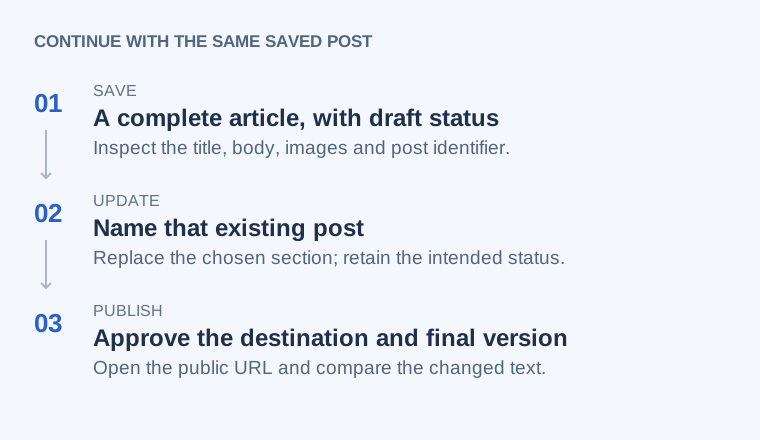
Finish the title, article body and image selection in the conversation first. “Write an article” and “save the article above” leave different amounts of work outstanding. If several drafts exist, identify the one to use by title.
Save “How to prepare a component drawing for supplier review” as a draft
on our connected WordPress.com site [domain]. Use the complete approved
article above, including its checklist and selected image. Do not publish.
Return the saved post identifier, link and status.
Review the proposed destination and content in the confirmation. Open the returned item in WordPress after the save. The requested title is illustrative; substitute the actual approved article.
Inspect and revise the saved item
- Read the opening, a middle section and the end; confirm that the full body was saved.
- Check table headings, code samples, images, captions and links in the preview.
- Confirm the status: draft, scheduled and published are different states in WordPress.com.
Update this existing draft: [article URL]. Replace only the field-mapping
section with the approved version above. Keep the other sections,
article address and draft status. Return the updated link.
Use the exact URL or identifier when several articles share a topic. If the main website reads a separate WordPress feed, also inspect its rendered page; a correct CMS draft can still be displayed incorrectly by the website template or cache.
When the saved result does not look right
| Symptom | Check before retrying | Next action |
|---|---|---|
| No usable save result | Search the destination Posts screen for the title and recent modification time. | If the post exists, continue from its identifier. If it does not, investigate the reported connection error before a new save. |
| Only an outline or part of the body appears | Compare the saved opening, a middle section and the ending with the approved article. | Update that existing draft with the missing content; inspect again before publication. |
| Draft saved, but publishing fails | Confirm the selected identity has permission to publish on that site. | Keep the draft and resolve permissions. A successful draft save does not prove publication access. |
| WordPress has the new text, but the website does not | Compare the CMS item with the public page. Check whether the site reads a separate feed or cached copy. | Investigate that rendering or cache layer instead of creating another article. |
Keep the returned post identifier, link, content and status together, and match them to the requested article on the selected WordPress.com site. A draft or published status answers a different question from whether the body is complete.
Publish or recover the existing article
When the draft is ready, explicitly request publication of that saved article and review the confirmation. Open the public URL afterwards, follow its links and check the changed passage. Remove any staging URLs before accepting the published result.
If access fails, check site selection and permissions while retaining the draft. If the outcome is uncertain, inspect WordPress before retrying; use the existing item when it was saved. The readback procedure covers duplicate prevention.